
Better Production Control Starts at the End of Your Sheeter or Press
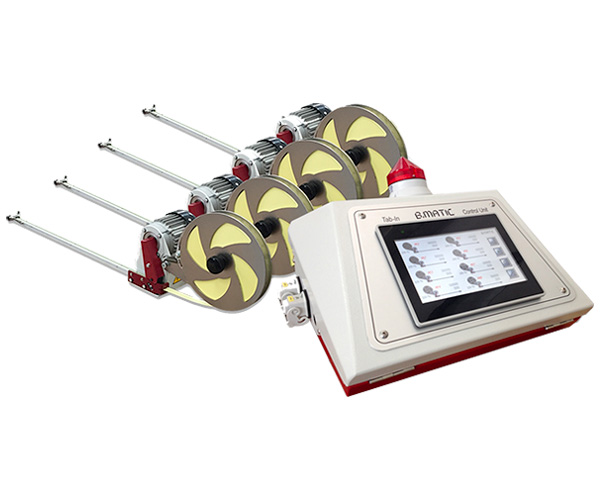
In converting and printing, production control does not end when the sheets leave the sheeter or press. In fact, this is often where one of the most important questions begins:
How many sheets are actually in each stack?
For converters, printers, and finishing operations, knowing the exact quantity of sheets moving from one process to the next can make a significant difference in productivity, inventory control, delivery accuracy, and the relationship between production teams.
The Problem: What Happens Between Processes?
After printing or sheeting, stacks of sheets may move through several operations before becoming a finished product:
- Printing
- Die cutting
- Hot stamping
- Laminating
- Folding and gluing
- Embossing
- Binding
- Packaging
- Other finishing operations
- …or directly to your customers!
When quantities are estimated, manually counted, or simply assumed to be correct, discrepancies can appear between processes.
A stack may be expected to contain 5000 sheets of high-quality cardboard or paper—but does it?
If the quantity is wrong, the problem may not become apparent until the next operation. Production may stop waiting for material, operators may have to recount stacks, or the finishing department may discover that it received fewer sheets than expected. These seemingly small discrepancies can create unnecessary work, delays, waste, and frustration for the people responsible for keeping production moving.
Count and Mark the Stack at the Source
A Tab-In Counter can be installed directly at the output of a sheeter or printing press to count sheets as they are produced and insert a physical tab at programmed intervals.
For example, if the required batch is 500 sheets, the system can insert a tab after the programmed number of sheets. The tab provides a clear physical reference within the stack, making it immediately visible where one batch ends and the next begins.
B.Matic’s TAB-IN Counter DX/SX, for example, is designed as an autonomous solution that can pair with most printing presses and sheeters, counting and tabbing at the end of the line without requiring a separate control system.
This approach is particularly useful when large quantities of sheets need to be separated for downstream finishing, shipping, or automation.
Better Control from Press to Finishing
Imagine a production workflow in which printed sheets leave the press and are subsequently sent to die-cutting.
With tabbed and accurately counted stacks, the die-cutting department receives material in clearly defined quantities. The same principle applies when sheets move to:
Press → Die Cutting → Hot Stamping → Lamination → Folding/Finishing → Packaging
Each department can work with clearly identified batches rather than relying on estimates or manually recounting every stack.
This creates a much more controlled flow of material throughout the factory.
Accurate Deliveries Build Customer Confidence
The benefits are not limited to internal production.
For paper converters producing sheets from rolls, accurate counting and tabbing at the output of the sheeter can provide an important additional benefit: confidence in the quantity delivered to the customer.
When every stack has been counted and physically marked, the converter has a much stronger basis for confirming that the promised quantity was actually produced and shipped.
This can help reduce complaints about short deliveries, unnecessary credits, and disputes over quantities.
The tab itself serves as a simple, visible indication that each stack has undergone a controlled counting process.
A Better Working Environment for Your Collaborators
There is also a human side to production control.
When one department repeatedly tells another that “the quantity was wrong,” someone has to stop production, recount material, investigate what happened, and explain the discrepancy.
These situations consume time and can create unnecessary tension between teams.
Accurate counting and physical batch marking remove much of this uncertainty. Instead of debating quantities, collaborators can rely on a clearly defined and repeatable process.
Better information means fewer disputes, fewer recounts, and a smoother handoff between production stages.
Small Investment, Practical Benefits
Tab insertion is not simply about placing a piece of paper inside a stack. Used strategically, it becomes a practical production-control tool.
Installed at the output of a sheeter or press, an automatic tab-in counter can help you:
- Establish accurate batch quantities.
- Clearly separate production batches.
- Improve material control between finishing processes.
- Reduce manual recounting.
- Identify quantity discrepancies earlier.
- Improve delivery accuracy.
- Reduce customer complaints related to shortages.
- Give production teams greater confidence in the material they receive.
And because the tab is physically present in the stack, the information does not depend entirely on paperwork, memory, or assumptions.
From the Press to Wherever the Sheets Go Next
Every production environment has its own workflow. Some sheets go directly to die cutting; others go through hot stamping, lamination, folding, gluing, binding, or several additional processes.
Whatever comes next, knowing exactly what quantity is moving forward is fundamental to production control.
Graftec’s Tab Inserting Solutions are designed to bring automatic counting and physical batch marking directly into these workflows. The equipment can operate at line speed and can be integrated with presses and sheeters, depending on the model and application.
For converters and printers looking to improve production control, delivery accuracy, and the efficiency of their finishing operations, putting an automatic tab-in counter right where the sheets are produced can be a surprisingly simple way to make the entire workflow more reliable.
Count it. Mark it. Move it forward with confidence.